Excessive Data Usage with iPhone 4S / iOS5

Got a new iPhone 4S or recently upgraded your iPhone 4 or 3GS to IOS5 and noticing unusually high cellular data usage? Are you close to exceeding your data usage limit when you never have before? Have you already exceeded it? You are not alone.

My wife recently traded in her old iPhone 3G for a shiny new iPhone 4S, and within 10 days had exceeded her 200MB AT&T data plan limit when she has never exceeded it before. So what gives? It’s a new phone, and Siri does transmit voice data back to Apple’s servers, but could that really have caused the usage?

Fixing The Data Usage Problem

Turns out the problem is that Apple ships iOS5 with iCloud data syncing over cellular networks ON by default. This means all the documents and data stored on your phone for all the applications you have installed on your phone will be automatically uploaded to iCloud, decimating your puny cellular data plan you thought you’d never burn through.

If you are experiencing super high data usage on iOS5, just follow these steps:

  1. Navigate to: Settings -> iCloud -> Documents & Data -> Use Cellular
  2. Turn it OFF
  3. Fight with AT&T (or other wireless carrier) about your excessive data usage charges
Why Apple would ever think its a good default to sync data and documents for all your phone’s applications over a cellular network in the world of severely limited data plans and usage based billing is beyond me. This, and the widespread battery issues with the iPhone 4S and iOS5 seem to indicate Apple didn’t do nearly enough field testing with the new phone or OS. Let’s home they learn from this in the future.

Usage Before iPhone 4S
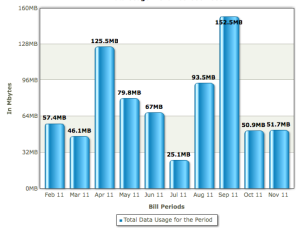
Some months have clearly higher data usage than others depending on how long we were away from home or what we did while we were out with out phones, but we were never in any real danger of going over the low 200MB limit before.

Data Usage after 10 days with the iPhone 4S
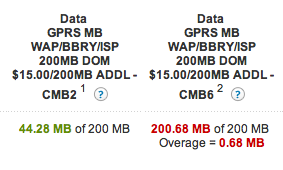

On the left (green) is my data usage with an Android device, Right (red) is my wife’s data usage this month with the new iPhone 4S.

My wife got a text alert for 65% data plan usage on Monday, and then one on Friday for 80%, and one the day after on Saturday saying she had gone over her limit (exceeding 100% of the plan) and that we would be billed an additional $15 by AT&T for the overage.


Tags: , ,
Hire Me

Have a problem you need help solving?
I'm available for freelance work. (and I love solving hard problems)

Trackbacks

  • 4S w Tmobile.pl

    [...] zużyciu transeru danych na iOS 5 z powodu właśnie wysyłaniu danych do chmury przez sieć kom: Excessive Data Usage with iPhone 4S / iOS5 | Vance Lucas Komputer: Macbook Pro 13,3" Telefon: iPhone 4s White iMessage: mirko.7911@gmail.com [...]

Comments

  1. Good article! I have the same problem on my wife’s phone but the documents and data was already off. There is a serious problem beginning here. Short of turning the phone off completely I can’t figure out anything else to do. Did your data usage go back to normal for you?

  2. A lot of the problems with “documents and data” is that apps aren’t really yet adhering to the rules. For instance, audible, tried to copy all it’s “data” to the cloud. Supposedly the only thing that should sync is data that couldn’t be re-downloaded from the site (ie written notes in note taker). I’ve read apple will begin to start enforcing these rules.

  3. Tried the iCloud solution noted above, a week ago. Unfortunately, this did solve the problem entirely… Any other suggestions?

  4. I have an iphone 4 and a iphone 4s. Upgraded from the 4 to the 4s just not set the 4s up yet. I upgraded to ios5 on my iphone 4 and BANG! went over 500mb of data in under 2 weeks…..when i have never been close to 200mb previously. I have checked all settings and all icloud options are off, cellular etc. I have now even turned off the the 3g for my phone!

    I got in contact with my carrier (o2) and they gave me a complimentary 500mb of data on this occasion but im paranoid that it may happen again! my solution? Well, im actually sad to say i have lost all faith in Apple and i am returning my iphone 4s, selling my iphone 4 and going elsewhere. And i have been with apple since they first came out….

    I’m contacting them directly to complain as well

  5. I have had an iPhone 3GS for 18 months and all was just fine. I updated my Mac to iCloud and the trouble started:
    Data Spikes on Nov 19 (503Mb), Nov 20 (231Mb), Nov 21 ( 609Mb + 266Mb). At this point, I am $75 over limits on my data usage through Rogers. Rogers says too bad. Suggested I upgrade to Blackberry as lots of iPhone customers have similar problems but I could turn off “Cellular Data” until I wanted to check my email, text, internet, etc.

    Using your advice I turned off “Use Cellular Data” but will have to wait to see if that resolves the problem.

    Advice?

    Jim

  6. I took delivery of 2 Iphone 4s 32GB – less than 10 days ago, and my 50Mb average Monthy usage is now 100Mb A DAY – But only one one phone (white) the other (black) is working perfectly and has the same IOS release.
    O2 (UK) are sending a replacement handset but I dont expect this will fix the issue.

    We had no Icloud account – so presumably not that – although most of the data usage was UP and not down!

    Bad days are out of the house when no WiFi!
    The worst day was 150MB and the battery used 95% in about a 12 hour period – I assume the problems are related.

    Apple Store offered to sway the phone – but dont do that if you will be sending it back to the suppliers (eg O2) as they will only accept their own phones back if you want to exit your plan within first 14 (or 28) day period due to faulty handset.
    Eric

  7. the problem is not the icloud data the problem is a bug that apple should be working on that any time you are connected to wi-fi and the phone locks the screen it kicks off wifi and at that point is using cellular. if you will watch the screen when you unlock you will see it flash 3g or e then get the wifi signal

  8. I’m having all of these problems. I’ve seen the 3g flash when I unlock my phone. Is there a way to stop this from happening until apple fixes the bug?

  9. Nice article. Thank you Vance! I had the same problem in my 4S, and yesterday I found the Documents and Data setting and turned it off. I did not determine yet if my problem was solved yet since at 183MB, I am just under my 200MB data allotment and don’t want to risk going over it. My billing cycle is ending in a couple of days, and I will check it then. I trust/hope that that will be it for me.
    However… There is something I still do not understand. If I go to Settings/Usage/Cellular Usage it lists under Cellular Network Data numbers for Sent and Received. The Sent one is only 33MB and the received 223MB, presumably since the Last Reset that took place on Oct 15, 2011. My ATT invoice’s details though claim several data charges for 6, 8, 20 or even 40MB each as SENT. BTW, several of them occurred after midnight when I was asleep. So… what does the Cellular Usage information refers to??? Im curious to know if you Vance have the same discrepancy between the ATT bill and and the info on the iPhone.
    Alejandro

  10. I turned off the Cellular Usage setting and am still having the problem.

  11. I experienced the same spike in data usage after upgrading my one year old iPhone 4 to iOS5. The only way to stop it was to turn off cellular data which effectively turned my phone into an iPod Touch. I’ve since deactivated my AT&T line mostly due to the frustration of not hearing from Apple on this issue.
    Surprisingly, my iPhone now gets close to 13 hours of usage on wifi which is simply outstanding :D

  12. For 2 1/2 years I averaged about 60mb per month with my old 3G model. Got the 4s 3 weeks ago and AT&T says I’m at 232mb already even though the iphone says I’ve used 80.4mb. One night at 10:30pm it billed me 112mb even though I wasn’t using it then and the phone was on my wi-fi. Was able to talk to an AT&T tech named Tony (after 4 transfers) who spent an hour with me and acknowledged there was a problem but he wasn’t able to figure it out. At least he gave me a $15 credit for the overage…this time.

  13. Ip4 just updated to ios 5 and first time ever I got txt fm Vodafone uk that I approaching 500mb limit!

    No iCloud account. No 3G in my area. Wifi always on at home. Never watch utube on cellular. Vodafone charge 5 gbp plus tax per 250 MB if you go over. This is crazy and as apple user of over 10 years I find this disgraceful.

  14. I have the Iphone4s. I have had it for 6 days. My average data usage in a month is around 100mb, but with the iphone4s in just 6 days I have used 104mb.

    By just playing around with my settings I have discovered that even with wifi switched on, Icloud appears to use up your data. I could litterally watch is ticking up on my data counter. Once I deleted Icloud from my phone the problem went away.

    So, I recommend that you only use Icloud when you have to. When you don’t need it, turn it off and delete the account. It is very simply to turn the account back on, you simply put in your password and it will work as before.

  15. i am having the same problem, my att cycle started 24nov and so far i have consumed 134mb with almost 0 usage, as there is wifi at home and at the office. i have called ATT and only offer to credit this month the additional 200mb/15usd. i have spent with the rep about 40 minutes with no results. She also told me to turn off the data on thwe i phone 4s. With all these problems of everyone ATT should not be greedy and offer the 15usd for 3-4GB.

  16. I noticed my issue started about 7 days ago. Never more than 15 MB in any day over the month, then suddenly, BANG, 100MB a day.

    I am getting high activity of WiFi and 3G.

    I have just turned iCloud off and delete the account, turned off documents syncing

    I’ll see what happens from now

  17. UPDATE

    After deleting my iCloud account my data has gone from doing 75mb in an hour (25 cellular and then 50 when I got home) to just 175KB in the last 15 mins so so..

    I think iCloud was the culprit for me at this time, but I have seen people saying they didnt have iCloud activated….Delete it and then restart the phone and watch the data monitor for a while. I use mydatamonitor recommended by O2 this afternoon.

    There dont appear to be any apps that will measure which app is doing the data, but I am told one is on the way..

    Hope this helps in some way

  18. I have just gone 1.6GB over my 500MB data plan. Definitely due to iCloud and the “Use Cellular” setting. I have wifi and work and home. My average is 100-200MB. My iCloud account is currently 1.9GB.

    I have just turned this off and contacted ROGERS, they have told me to wait for my Bill and call them back.

    Apple really needs to address this issue.

  19. $50 later in overage fees and I think I finally figured out a solution! Buried in Settings, About, then Diagnostics & Usage, change the defaulted “Automatically Sent” to “Don’t Send.” This will prevent your phone from automatically sending DAILY diagnostic and usage data. If you click on Diagnostic & Usage Data, you can see the ridiculous amount of info that is being sent using your data plan. It’s only been two days, but so far, my data usage has significantly decreased and I’ve even checked my email and used google maps out on the road! Do I dare say it’s nice to have my smart phone back?? I was beginning to feel like I had a ipod touch! Hope this helps.

  20. I had similar issue,called my service provider and it was useless.Thanks for the forum.

    After updating to iOS-5 few weeks ago,suddenly last week within 24 hours all the 200MB was used up.I never activated my iCloud,but after reading this post I checked to notice that >Cellular Data option was ON…turned it off and deleted my account,but whenever I check back on the account I find the options back in ON position.I have no choice but keep the account and make sure it is OFF,if this is the actual problem.

    Every time I switch on Data even with the presence of Wifi,uses up 4kb in a minute precisely.

  21. I deleted the icloud account on my phone. Which is helping. with the icloud account I was doing an avg of 150 mb/day. now it is 10 mb/day which is my usual avg.

    Thanks

  22. I think I found the problem to the overage on data usage!!!!! I have had tha same problem with my wife’s iphone4S with going over her data! Within 7 days AT&T told us through a text that my wife used all of her data( which was 2gb)! How is that possible? My wife hardly ever even uses the Internet on her phone when she’s out of the house or even in the house! And what’s even more crazy is all the places she goes to and actually uses her phone for Internet have free wifi!!!! So I am extremely pissed! When we called AT&T to complain about this problem and to figure out why this was happening they really didn’t have an answer! Which did not settle my anger. But what AT&T did to help us avoid the overage charge was to give my wife 4gb of data for the same price as 2gb of data! How nice right? Well unfortunately we were wrong thinking this would help because at 5 am this morning on January 13 2012 I was awakened by my wife’s phone saying that she had used over 80% of her data!! That’s right she had used now 80% of her data in only three weeks!!!!! That to me is impossible! I have an iPhone and I don’t even use that much!! This is driving me crazy! So anyway to how to fix the problem! I have read a lot of the articles and have tried them which help, but make sure to help with this problem you have to go to your settings– then to iCloud— then scroll down tithe bottom! There you will see an icon saying storage & backup! Click on that! Now here is the tricky part if you want to continue using Icloud to store your stuff without connecting to your computer using a cord then you need to manage it! This is where I believe the problem area is! So if you click on manage storage then click on your phone in the menu it will take you to the info area! Here is where you manage your ICloud!!!! Now remember if you want to continue storing your stuff from your iPhone with out actually connecting to your computer than you need to always manage this area or it will make you go over( I believe) every time on your data! You’ll see when you get I to the info it will say “backup options”. You’ll notice bellow that all of your apps! It’s very important to look at all the apps and see how much and app uses to save to ICloud! If you want to save through iCloud then don’t touch these on off buttons on these pages and you just keep getting an overcharge on your data! To to finish this process you need to next turn off all back ups on these apps! When you do this it will ask you to turn off and delete! Press turn of and delete! You should still be able to back this info up to your computer just like you use to with your old iPhone by plugging it in! Now once you’ve done all that and tha apps are turned off it shouldn’t backthem up to iCloud anymore saving you the hassle of being overcharged!!! REALLY IMPORTANT if you want your photos to back up then keep that one on! But remember to look at how much storage capacity it takes up!!! My wife’s photo storage from her phone is Over 4.5gb! This I believe is what is tipping us over the edge of that 4gb data plan! One last thing don’t forget to go back from the info page to the storage & backup page and at the bottom turn the iCloud backup off!! That’s very important to prevent the phone from trying to save the info back to iCloud when you are asleep! I hope this will help anyone who is having the same problem I am having! Also remember to never stop fighting for what’s right! Don’t let the phone companies play you stay on the phone as long as you can to get them to help you fix the problem and hopefully to help you get a credit so you have time to fix these issues and don’t get charges you don’t want! Richard S.

  23. I have been wracking my brain on this issue for over a week, I had excessively high data charges on my ATT Wireless account after purchasing a new 4s. In less than a week, I had over 1.1 GB of data transfers with over $150 in excess data charges.

    I went in to the store a number of times, tisk tisk, it’s Netflix, it’s Pandora. You need to upgrade your data plan. It’s only ten bucks to upgrade your data plan to the 2 GB plan.

    I questioned iCloud but in the store and on the internet, other references I had found said that iCloud was network aware and would only transfer over Wifi.

    But the data transfers were huge, 150 – 250 MB at a time. I disabled Netflix and Pandora,still had the problem. I tested what a typical Netflix movie transfer was over the 3G network and it was something like 20mb, nowhere near 200mb.

    I searched the internet and could not find anything, until I happened across your gem of a post this morning. Ten minutes later, the problem was fixed and I just got off the phone with ATT where they agreed to credit me over $150 in data charges.

    Thank you so much for this excellent post!!!

All content copyright © 2013 Vance Lucas | Powered by WordPress | Entries (RSS) | Comments (RSS)